Hitting LinkedIn’s connection limits? You’re not alone. This comprehensive guide breaks down everything you need to know about LinkedIn’s restrictions, and more importantly, how to work within them effectively without risking your account.
Understanding linkedIn’s connection ecosystem
LinkedIn uses behavioral restrictions to prevent spam and maintain platform integrity. These limits affect connection requests, messages, profile views, and more.
Quick reference: LinkedIn limits at a glance
Important Notes:
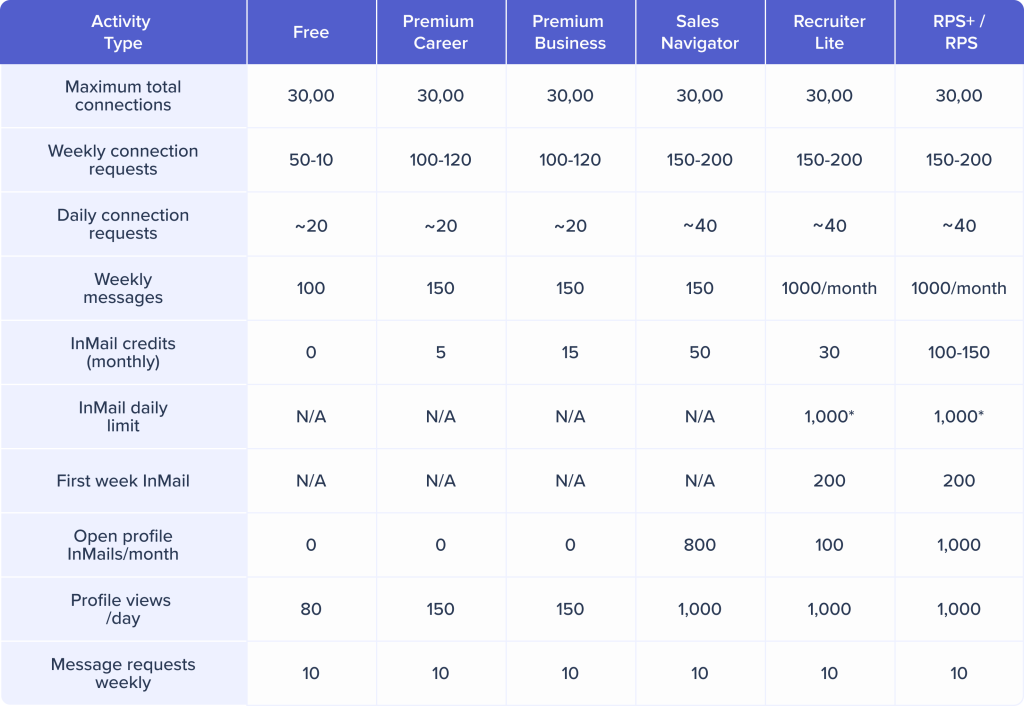
- *New Recruiter/Recruiter Lite seats are limited to 200 InMails in their first week, then scale to 1,000/day
- Open Profile InMails don’t count against your monthly InMail credits
- InMail credits are refunded if recipient responds within 90 days
- All limits use Coordinated Universal Time (UTC) for calculations
- Actual limits vary based on account age, SSI score, and acceptance rate
How many connection requests can you actually send?
LinkedIn operates on a rolling weekly limit. When you send your first connection request on Wednesday at 2:00 PM, your limit resets exactly seven days later – Wednesday at 2:00 PM.
Most LinkedIn accounts can send ~100 connection requests per week. LinkedIn adjusts this based on:
- Account age and history
- Social Selling Index (SSI) score
- Connection acceptance rate
- Overall engagement patterns
High-performing accounts may reach 150-200 weekly, while flagged accounts drop to 20-30.
Daily connection request patterns
Sending all 100 requests on Monday morning screams “automation.” Instead, distribute your outreach across the week roughly 15-20 requests per day to create natural patterns.
Never deploy automation on new accounts. Warm up first with manual activity for 30 days, then introduce automation gradually.
Profile view limits
LinkedIn restricts daily profile views:
- Free accounts: 80 views per day
- Premium accounts: 150 views per day
- Sales Navigator/Recruiter: 1,000 views per day
Strategic viewing approach: Research prospects in batches, prioritize high-value targets, and use profile views intentionally rather than browsing randomly.
Message limits
LinkedIn limits weekly messages to existing connections:
- Free accounts: 100 messages per week
- Premium accounts: 150 messages per week
- Sales Navigator/Recruiter: Messaging is separate from InMail allocations
Strategic approach: Prioritize follow-up messages to engaged prospects. Weekly limits reset on a rolling basis, similar to connection requests.
InMail limits and strategy
InMail credits are monthly allocations for messaging non-connections:
- Premium Career: 5 credits/month
- Premium Business: 15 credits/month
- Sales Navigator: 50 credits/month
- Recruiter Lite: 30 credits/month
- LinkedIn Recruiter: 100-150 credits/month
Best practices:
- Subject line determines open rates (keep under 200 chars)
- Personalize extensively using profile information
- Clear call-to-action in first paragraph
- Use credits for high-value targets only
What triggers the “You’ve reached your weekly invitation limit” warning?
Seeing this notification is LinkedIn’s way of telling you to slow down. But it’s more than just a gentle reminder – it’s a red flag in your account’s behavioral history.
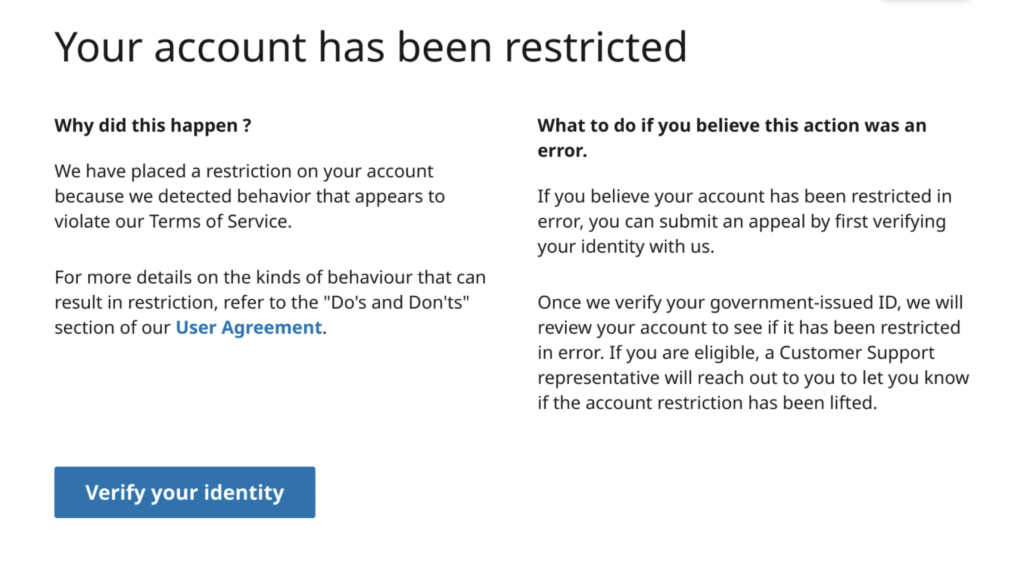
When you hit this limit, LinkedIn’s algorithm begins monitoring your account more closely. The platform will scrutinize:
- How quickly you resume sending requests after the reset
- Whether your connection acceptance rate improves
- Overall activity patterns
- Any signs of automated behavior
Ignoring warnings leads to progressively severe consequences:
- First strike: Temporary activity restrictions (7-14 days beyond standard reset)
- Second strike: Search functionality limitations
- Third strike: Temporary or permanent account suspension (recovery requires LinkedIn support contact)
The Social Selling Index for higher limits
Your LinkedIn Social Selling Index (SSI) is a 0-100 score measuring platform effectiveness. Higher SSI means higher connection limits – users with 75+ SSI often reach 150-200 weekly requests vs the standard 100.
LinkedIn’s SSI evaluates you across four key pillars, each contributing 25 points:
- Establish your professional brand – Complete profile and thought leadership
- Find the right people – Quality targeting and search usage
- Engage with insights – Content sharing and community participation
- Build strong relationships – Response rates and active conversations
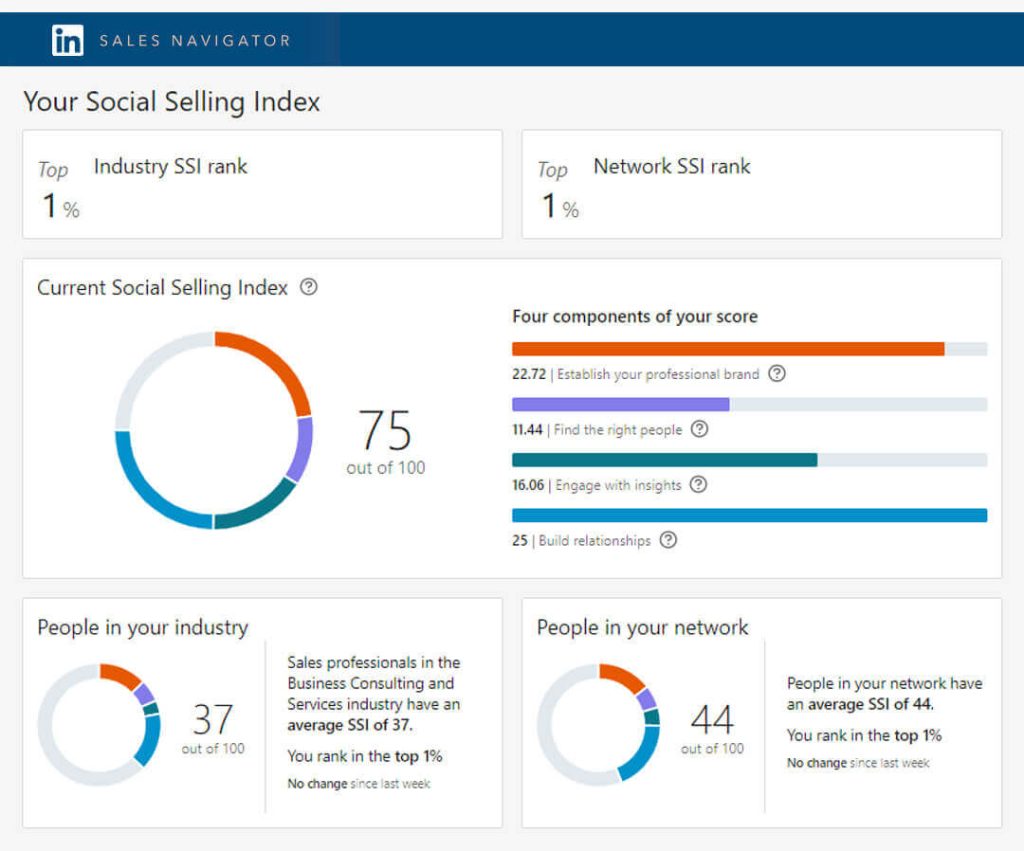
You can check your current SSI score at linkedin.com/sales/ssi.
Maintaining SSI with automation support
The biggest challenge is maintaining consistent daily activity. Tools like Wandify help maintain engagement patterns that LinkedIn’s SSI algorithm rewards—profile visits, content engagement, and strategic connection requests—without sacrificing hours each day.
Best approach: Combine automation for routine tasks with genuine engagement (comments, conversations). This hybrid maintains high SSI while maximizing efficiency.
“Fuse Limit” concept
The fuse limit is LinkedIn’s undocumented soft restriction system that many users discover the hard way. When LinkedIn’s algorithms detect suspicious patterns – sudden spikes in activity, low acceptance rates, or robotic behavior – they don’t immediately restrict your account. Instead, they implement a graduated response system.
How the Fuse Limit Works
The fuse limit is LinkedIn’s undocumented soft restriction system. When LinkedIn detects suspicious patterns, sudden spikes, low acceptance rates, or robotic behavior, they implement a graduated response.
Your account gets a “trust score” based on historical behavior. Every suspicious action depletes this trust. As trust drops, LinkedIn becomes more sensitive to your actions.
Example: You might send 100 requests weekly without issue. After triggering monitoring, that threshold might drop to 50, then 30, then 10, until even a single request triggers restrictions.
Recovery protocol:
Week 1-2: Complete activity pause. Focus on organic engagement – commenting, sharing content, responding to messages.
Week 3-4: Send 3-5 carefully targeted, highly personalized connection requests daily. Aim for 50%+ acceptance rate.
Week 5-6: Gradually increase to 8-10 daily requests if acceptance remains high.
Week 7+: Only after consistent positive behavior, consider reintroducing automation at conservative settings.
Simple tips for maximizing connection capacity
The most effective way to extend limits: improve your acceptance rate. LinkedIn cares about quality over quantity. A user sending 50 requests weekly with 80% acceptance faces fewer restrictions than someone sending 100 with 20% acceptance.
Profile elements that drive acceptance:
- Professional photography. High-quality headshot with professional attire. Profiles with professional photos receive 14x more views.
- Compelling headline. Value-focused and clear. “Helping B2B SaaS Companies Scale Revenue” beats “Sales Manager.”
- Strategic section. Write for your ideal connections. What problems do they face? How can you help?
- Activity showcase. Pin best content in the Featured section. Shows active engagement.
- Recommendations and endorsements. Social proof. 10+ recommendations = higher acceptance rates.
Account warming
Brand new LinkedIn accounts face the strictest scrutiny. LinkedIn assumes new accounts are more likely to be fake profiles or spam operations until they prove otherwise.
The 30-day warm-up protocol:
Days 1-7:
- Send 5 connection requests daily, all to people you genuinely know
- Comment thoughtfully on 5-10 posts daily
- Update your profile sections one at a time
- Join 2-3 relevant industry groups
Days 8-21:
- Gradually increase to 15 connection requests daily
- Publish original content
- Participate in group discussions
- Respond to all messages within 24 hours
Days 22-30:
- Reach 20 connection requests daily
- Achieve 50%+ connection acceptance rate
- Build SSI score above 50
- Participate actively in group discussions
Only after completing this warm-up should you consider implementing any automation or aggressive outreach strategies.
Professional automation with extended capacity
While LinkedIn’s native limits restrict most users to 100 weekly requests, professional automation platforms manage campaigns more efficiently.
What Wandify manages:
- Profile research at scale – Analyze more prospects without hitting view limits
- Connection request automation – Distributes requests throughout the week (15-20 daily), randomizes timing, pauses weekends automatically
- Message management – Sends follow-ups to accepted connections while tracking weekly limits
- Campaign organization – Multi-step sequences: connection → wait 3 days → message if accepted → follow-up
- Acceptance rate monitoring – Tracks engagement, prioritizes follow-ups
Account safety built-in:
- Natural behavior patterns – Varying send times, incorporating breaks
- Multi-limit coordination – Balances views, requests, and messages simultaneously
- Automatic adjustments – Slows activity when acceptance rates drop
- Weekend/off-hours pauses – Stops activity when real professionals aren’t active
Instead of manually tracking limits, Wandify runs campaigns consistently while keeping your account secure.
Here’s what matters
LinkedIn limits everything: connection requests, messages, profile views, InMails. Manually tracking all this while building a pipeline is inefficient.
Wandify automates the grunt work while keeping you compliant. It tracks every limit, distributes activity naturally, and protects your account so you can focus on conversations that convert.
LinkedIn’s limits don’t have to slow you down with the right system. Try Wandify and see how automation should work—safe, smart, and effective.